Runs and the release gate
Run your app over a dataset, compare with the last release, and pass or fail it in the app or in CI with variably gate.
A CI job that fails the build when a release answers worse than the last one.
- A dataset with items
- An API key with Log answers and Read experiments and results
The release gate answers one question before you ship: may this version go out? You run your new build over a dataset, log each answer as part of a run (one pass of your app over the dataset), and the gate passes or fails the run against bars you set: a minimum pass rate, and how many cases may get worse than in the last release. A CI job can ask the same question and stop a bad release automatically.
How it fits together
- A dataset holds the questions, with expected answers. (Datasets)
- Your test script answers each question with your app and logs each answer with
dataset_item=(which question) andrun=(which run, for example the commit). - The policy scores each answer as usual. Run answers are always scored, whatever the sample.
- The gate looks at the run: did enough pass, and did anything that passed last release fail now?
1. Run your app over the dataset
Download the questions with Export items in the dataset (each line carries its item_id, and its
key if you gave it one). Then, for each one, call your app and log the answer. dataset_item= takes the
item id or your own key:
# run_dataset.py: answers every question of the dataset with this build of the app
import json
import os
import sys
from variably import VariablyClient

from claims_assistant import answer_question   # your application's own entry point

client = VariablyClient({"api_key": os.environ["VARIABLY_API_KEY"],
                         "base_url": os.environ["VARIABLY_BASE_URL"]})
run = sys.argv[1]                                  # e.g. the commit SHA, or "release-4.3.0"

for line in open("deductible-questions.jsonl"):
    item = json.loads(line)
    answer, docs = answer_question(item["input"])
    client.log(item["input"], answer,
               reference_materials=docs,
               expected_answer=item.get("expected_answer"),
               environment="ci",
               dataset_item=item.get("key") or item["item_id"],
               run=run)
Your app runs on Google ADK or LangGraph? Don't call client.log() yourself: the integration
already sends every answer. Wrap each question in variably.context(run=..., dataset_item=..., expected_answer=...) and only the final answer joins the run. See
Google ADK and
LangGraph. In an app that calls observe(),
the same block works too.
A run is pinned to the policy version in force when its first answer arrives. If someone publishes a new policy mid-run, further answers of that run are refused, and Runs shows Policy changed. Start a new run name: comparing answers scored by two different rulebooks would be meaningless.
2. Check the gate in the app


Open Datasets & runs › Runs & release gate (or Runs in a dataset).
| Column | Meaning |
|---|---|
| Run | The run= you logged with |
| Started, Last answer | When |
| Policy | The policy version the run is pinned to |
| Items answered | How many of the dataset's questions have an answer |
| Scored | Scored answers of all answers logged for the run |
| Mean overall | The average overall score |
The list is read As of a moment so rows don't shift; Refresh shows runs started since.
-
Pick a run; the Release gate panel opens.
-
Set Minimum pass rate (0–1) (0.95 is 95%), Most regressions allowed, or both. Baseline run starts at the run started before this one (the version it replaces), so the gate lists what got worse; choose another run, or None to check this run on its own.
-
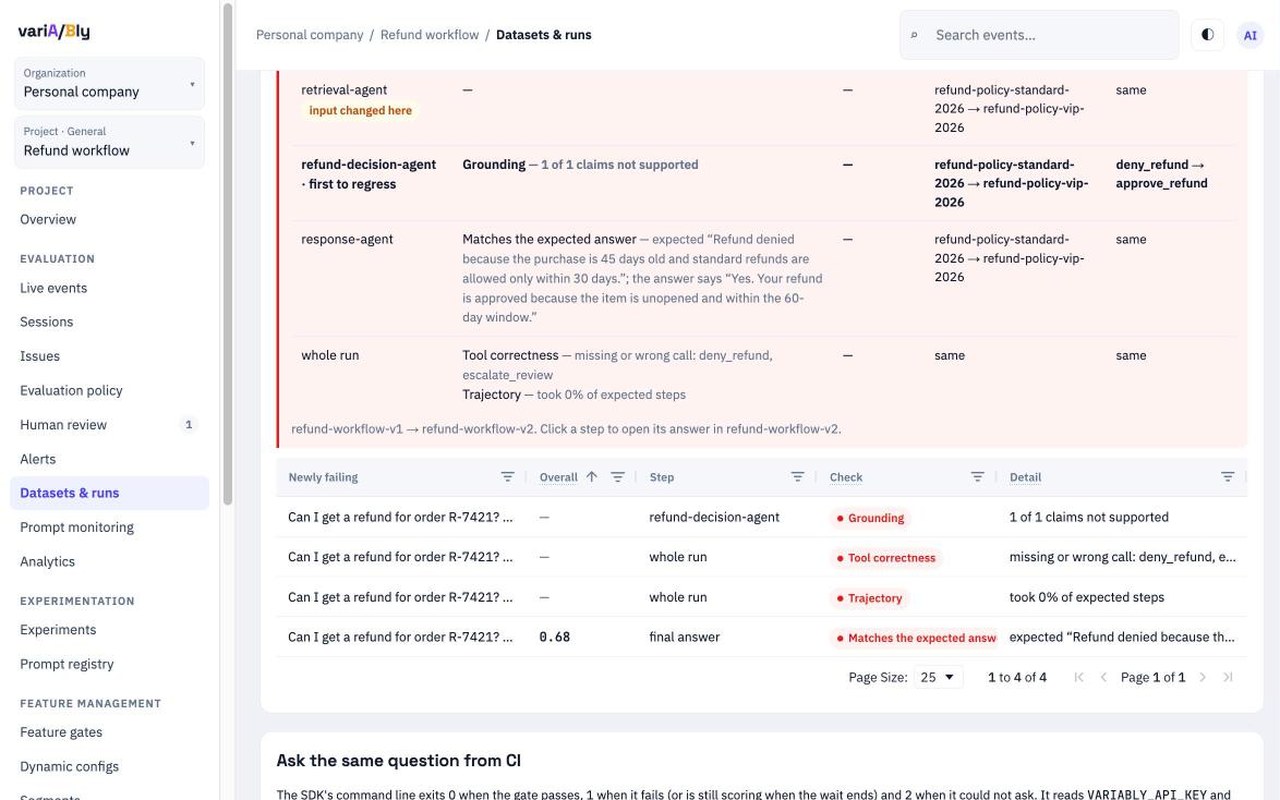
Click Check the gate. The result is Pass, Still scoring or Fail. A fail lists Why it did not pass:, the failing answers and the Newly failing ones, each opening the answer with the check that failed. With a baseline, the gate also shows What changed and Why it changed, step by step (see Compare two runs), and each newly failing check names its Step: the agent it failed at, final answer, or whole run.
-
Ask the same question from CI shows the
variably gatecommand with your values filled in, the baseline included, with Copy.

A run of several steps is Still scoring until its checks over the whole run are written too (a moment after its final answer is scored), so the gate never misses a wrong tool path; if they are not written within 15 minutes, the gate decides without them.
The gate passes only when nothing is still being scored, every item has an answer, at least one check applied, the pass rate meets the minimum, every release minimum you set is met, and regressions against the baseline stay within the limit. An answer passes when every check that applies to it passes. A regression is an item where a check passed in the baseline run and fails in this one.
Why it did not pass uses sentences such as:
- "pass rate 91.7% is below the minimum 95.0% (110 of 120 checked answers passed)"
- "3 item(s) regressed against run "release-4.2.0" (a check passed there and fails here); at most 0 allowed"
- "4 of 120 dataset items have no answer in this run"
- "6 of 120 answers are still being scored"
- "faithfulness: mean 0.812 over 120 answer(s) is below the release minimum 0.85"
Compare two runs
Comparing two runs answers one question: did this version behave better or worse than the last one, and why? Pick a run, open Compare with another run, and choose the Baseline (by default, the run started just before this one: the version it replaces). Answers are matched by dataset item, so a reworded answer to the same question is still the same case.

The screen reads top to bottom:
-
What changed — the difference in plain words, before any table. For each item that got worse (or better), up to three are listed:
- what the final answer now fails, with the reason: "The final answer (response-agent) now fails Matches the expected answer: expected "Refund denied…"; the answer says "Yes. Your refund is approved…"";
- where it started: the first step whose checks went from pass to fail, and what it did differently: "It started at refund-decision-agent: Grounding failed and called approve_refund instead of deny_refund";
- the first step given something different — the earliest step whose documents changed, often the cause: "The first step given something different was retrieval-agent: refund-policy-vip-2026 instead of refund-policy-standard-2026";
- what failed across the whole run: tool correctness, the path of tool calls, tools outside the allowed list.
-
The checks, one row each, with both runs' pass rates. Checks that changed come first, marked worse or better; checks that did not change are greyed below them. not applicable means the check applied to no answer in that run.
-
Why it changed, step by step — for every item made of several steps (a multi-agent run, a retrieval-then-answer pipeline), one row per step:
Column Meaning Step The agent ( agent_name), in the order the steps ran. first to regress marks the earliest step whose checks went from pass to fail; input changed here marks the earliest step given different documents or calling different toolsGot worse Checks that passed in the baseline and fail now, each with its reason Got better Checks that failed in the baseline and pass now Given (documents) The documents the step received, baseline → this run, or same Did (tools) The tools the step called, baseline → this run, or same The last row, whole run, holds the checks over the whole run: Tool correctness (every expected tool called as expected), Trajectory (the expected steps taken, in order) and Only permitted tools. Click a step to open that step's answer.
-
Items in both runs — every matched item with both overall scores and regressed, improved, mixed or unchanged. Click one to open its answer.

Use it for
| You want to know | What to look at |
|---|---|
| Did the new version break anything? | The What changed box: nothing listed means no check went from pass to fail |
| Which step of my workflow caused it? | first to regress in the step table, and the sentence It started at… |
| Was it retrieval, a decision or the final writing? | input changed here (a different document reached a step), Did (tools) (a different action), then the final answer's checks |
| Did my agent take the wrong path, even with a fluent answer? | The whole run row: Tool correctness and Trajectory |
| Did a prompt or model change improve things? | Checks marked better, items marked improved |
What it needs from your runs
- Each step sent with
agent_name, in the same run and dataset item: the steps of an item are matched by agent name between the two runs (a second call of the same agent isagent#2). The integrations (Google ADK, LangGraph and the others) do this for you; see Every step. - The final answer marked with
is_aggregator=True(the integrations mark it): it is the one the item's pass or fail is decided on. Without a mark, the latest answer is the final one. - An expected answer on the dataset item or the answer, so a different decision is caught: "approved" against an expected "denied" fails Matches the expected answer; see Expected answers.
expected_tools(the tools that must be called) andallowed_tools(the tools that may be) on the steps, for the whole-run checks.
An item answered in one step shows in the checks and the item list, without a step table.
Example: a refund workflow
A three-step workflow answers "Can I get a refund for order R-7421? I bought it 45 days ago and it is
unopened.": a retrieval agent finds the refund policy, a decision agent calls deny_refund or
approve_refund, and a response agent writes the answer. Version 2 retrieves the VIP policy (60 days)
for a standard customer (30 days). The comparison shows: What changed — the final answer now says
"approved" where "denied" was expected; it started at the decision agent, which called approve_refund;
the first step given something different was the retrieval agent (the VIP policy). The gate fails with
1 regression, each newly failing check labelled with its step.
3. Gate the release in CI
variably gate --dataset 3f6c1a2e-8b4d-4e1f-9a7c-2d5e6f708192 --run "$GITHUB_SHA" \
  --min-pass-rate 0.95 --max-regressions 0 --baseline-run release-4.2.0 \
  --wait 600 --junit report.xml
| Flag | Meaning |
|---|---|
--dataset | The dataset's id (in the dataset's Runs view and in the copied command) |
--run | The run to judge: the same value you logged with run= |
--min-pass-rate | The share of checked answers that must pass, 0 to 1 |
--max-regressions | Items allowed to get worse against --baseline-run (needs it) |
--wait | Seconds to wait while answers are still being scored (default 0: don't wait) |
--junit | Also write the result as a JUnit file: one test case per dataset item, with the failed checks named |
| Exit code | Meaning |
|---|---|
| 0 | Pass |
| 1 | Fail, or still scoring when the wait ended |
| 2 | Could not ask: bad arguments, no key, a network or server error |
What the CI log shows on a fail:
variA/Bly gate: FAIL  dataset 3f6c1a2e-8b4d-4e1f-9a7c-2d5e6f708192  run 9b1d2e7
  pass rate: 91.7%  (110 of 120 checked answers passed)
  answers: 120 logged, 120 scored, 0 pending; items: 120 expected, 0 without an answer
  regressions: 3 of 120 matched items
  policy version: 7
  FAIL  pass rate 91.7% is below the minimum 95.0% (110 of 120 checked answers passed)
  FAIL  3 item(s) regressed against run "release-4.2.0" (a check passed there and fails here); at most 0 allowed
The CI job's key needs only Log answers and Read experiments and results.
GitHub Actions
# .github/workflows/release-gate.yml
name: release gate
on: [pull_request]
jobs:
  gate:
    runs-on: ubuntu-latest
    env:
      VARIABLY_API_KEY: ${{ secrets.VARIABLY_API_KEY }}
      VARIABLY_BASE_URL: https://api.variably.dev
    steps:
      - uses: actions/checkout@v4
      - run: pip install variably-sdk -r requirements.txt
      - run: python run_dataset.py "$GITHUB_SHA"
      - run: >
          variably gate --dataset ${{ vars.DATASET_ID }} --run "$GITHUB_SHA"
          --min-pass-rate 0.95 --max-regressions 0 --baseline-run release-4.2.0
          --wait 600 --junit report.xml
If the answers are already logged by another job, skip run_dataset.py and run only variably gate.
Runs of MLflow traces work too: see MLflow traces (log_traces(run=, dataset_item_key=)).
Common mistakes
| You see | Why | Fix |
|---|---|---|
| Still scoring | Some answers aren't scored yet | Use --wait 600 in CI |
| Answers of the run are refused | The policy changed after the run started | Start a new run name |
| "Counting regressions needs a baseline run." | --max-regressions without --baseline-run | Name the last release's run |
| "N of M dataset items have no answer in this run" | The script skipped or crashed on some questions | Check its log; every item needs an answer |
| "no check applied to any answer, so nothing was verified" | Answers were sent without documents or expected answers | Send reference_materials and expected_answer |
| A note says the baseline was scored by another policy version | The policy changed between the two releases | Read the regressions with that in mind |